
Easy Execute
Several strikes by spot points
Lots on many strikes, started at a spot level, with targets and stop-losses worked out from the delta.
Put lots on several strikes of one expiry. Each strike goes in now, or when the spot has moved a number of points up or down. You give one target and one stop-loss in spot points, and the plan works out each strike's own option target and stop-loss from its delta.
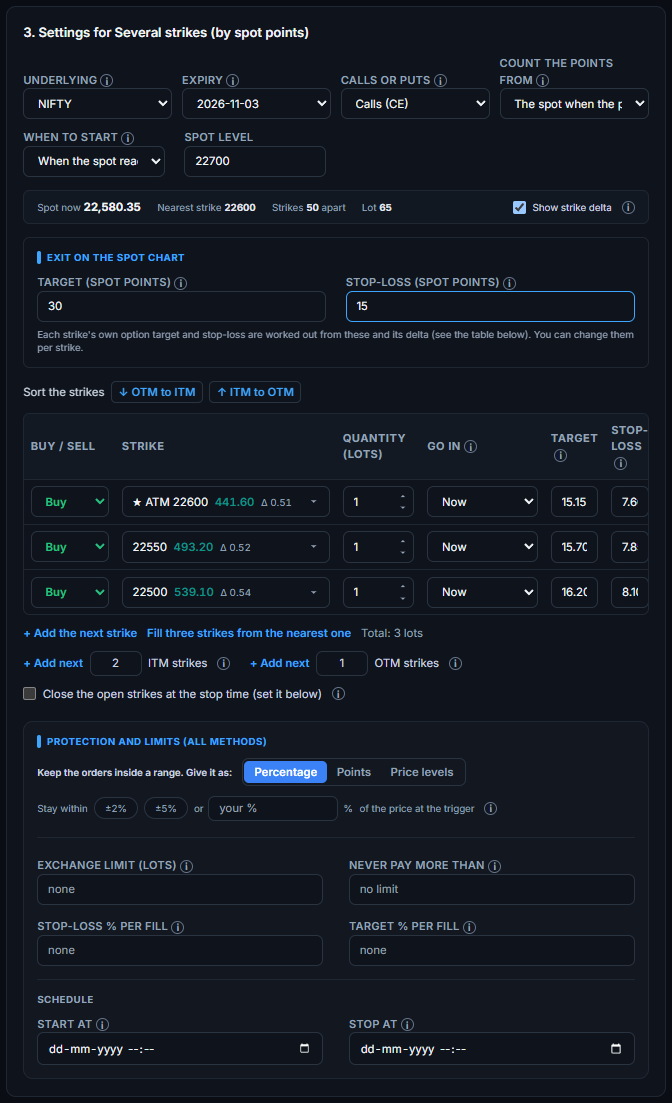
When to start
- Execute now: the plan starts at once, while the market is open.
- When the spot reaches a level: type a level such as 22700. Nothing is placed until the spot gets there, from above or from below. The page shows what the plan is waiting for, and then the strikes go in. The entry points are counted from the spot at that moment, unless you typed a reference spot.
Choosing the strikes
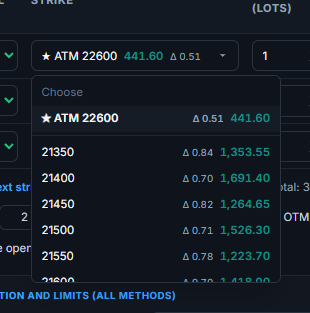
- Strike list: every strike shows its price and its delta, for example 22550 · Δ 0.52 · 493.20. The at-the-money strike is first, marked with a star. Switch “Show strike delta” off to hide the delta.
- Add next [number] ITM strikes and Add next [number] OTM strikes: type how many, press the button, and that many strikes are added one step further in or out of the money than the ones you already chose. For calls, out of the money is higher; for puts it is lower.
- Sort the strikes: put them in order from the highest out-of-the-money strike to the highest in-the-money strike, or the other way round.
- Quantity has small arrows: one more lot or one less, never below one. The Up and Down keys do the same.
- Buy / Sell on every strike: mix bought and sold strikes in one plan.
- Go in: now, when the spot rises, or when it falls. The number of points appears under the box, with the exact spot level.
Exit on the spot chart
Type a target and a stop-loss in spot points, for example 30 and 15. Each strike gets its own target and stop-loss in its own price: the spot points times that strike's delta. A spot target of 30 and a delta of 0.5 gives an option target of about 15. You can type another number for any strike, and “auto” puts the worked-out number back.
- The target and stop-loss go on the order of each strike, so they are watched on the option price from the moment it is bought.
- The delta is worked out from the strike's price and the spot when you set the plan. It does not change afterwards.
- For a bought call or a sold put, the spot rising is in your favour; for a sold call or a bought put, falling is.
- Optional: close the open strikes at the stop time.
Note. If the delta cannot be worked out, for example when there is no price, the strike keeps the spot-point exit: it is closed when the spot has moved that many points for or against you since the strike went in.