
Easy Execute
Protection and limits
Price range, trigger price, price limit, stop-loss, target and times.
These options apply to every method. They sit in the Protection and limits panel at the end of the settings.
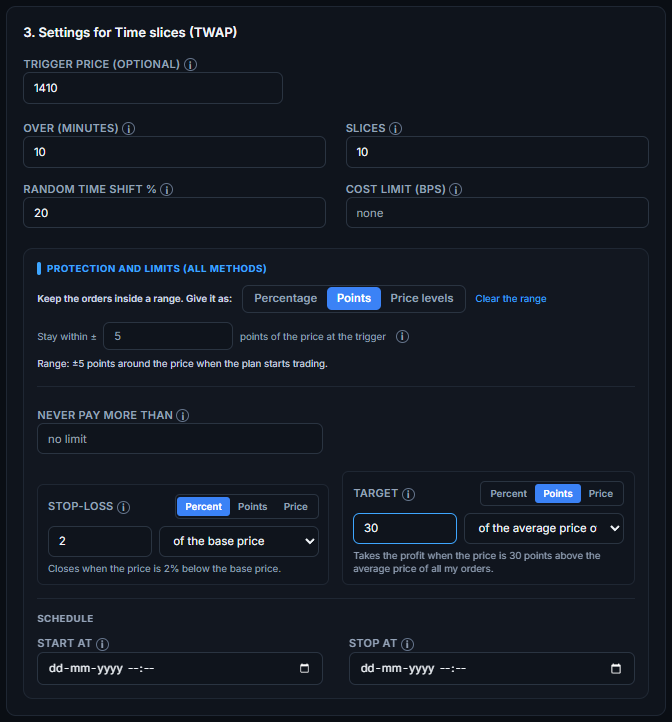
Keep the orders inside a range
Switch between three ways to give the range:
- Percentage: stay within 2% or 5% of the price at the trigger, or type your own percentage (up to 50).
- Points: stay within a number of points of the price at the trigger, for example 5.
- Price levels: orders are placed at any price between a lowest and a highest level you type. For futures and options you can apply the levels to the contract's own price, or to the chart it follows. Example: 23000 and 23500 on the NIFTY chart means a NIFTY option is bought only while NIFTY trades between those two levels. Outside them the plan waits and carries on when the chart comes back inside.
The trigger price
The percent and points ranges are counted from the trigger price. Leave the box empty and the system uses the price of the plan's first order (a ladder uses its own base price). Type a price and the range, and any stop-loss or target counted from the base price, are measured from that price instead. Example: trigger 150 and a 2% range gives 147 to 153.
Stop-loss and target
Each one is given as a Percent, as Points, or as one exact Price. For a percent or points you also choose what it is counted from:
- The price of each order: every order that opens a position gets its own stop-loss and target.
- The base price: the trigger price you typed, or the price of the first order. Every order gets the same level. Base 150 and 2% gives a stop-loss at 147.
- The average price of all my orders: the average moves as orders fill, so the plan itself watches it. When the price reaches the level, the waiting orders are cancelled, everything bought is closed at market and the plan finishes.
A sentence under each box says what it will do in your own numbers, for example “Closes when the price is 2% below the base price.”
The other options
- Never pay more than / Never sell below: a price limit so the plan does not chase a runaway market.
- Start at and Stop at (the Schedule): the time window in which the plan may trade.
- Exchange limit per order: change it if the current exchange circular differs from the built-in list.
Note. A range set in percent or points is fixed once, at the price of the first trade. After that it works like your own lowest and highest price. The range options are not used by the several strikes method, which has its own exit rules.
Note. Want stop-losses and targets such as trailing stops, ATR, EMA crossover or Heikin-Ashi? See Professional Target / Stop-loss.