
Trade
Alerts on trend lines
Get an alert when the price crosses a line you drew.
Draw a trend line, a ray or an extended line, press the bell on its small toolbar, and the alert watches the line itself. A sloping line is at a different price every minute, and the alert follows it.
What you can do
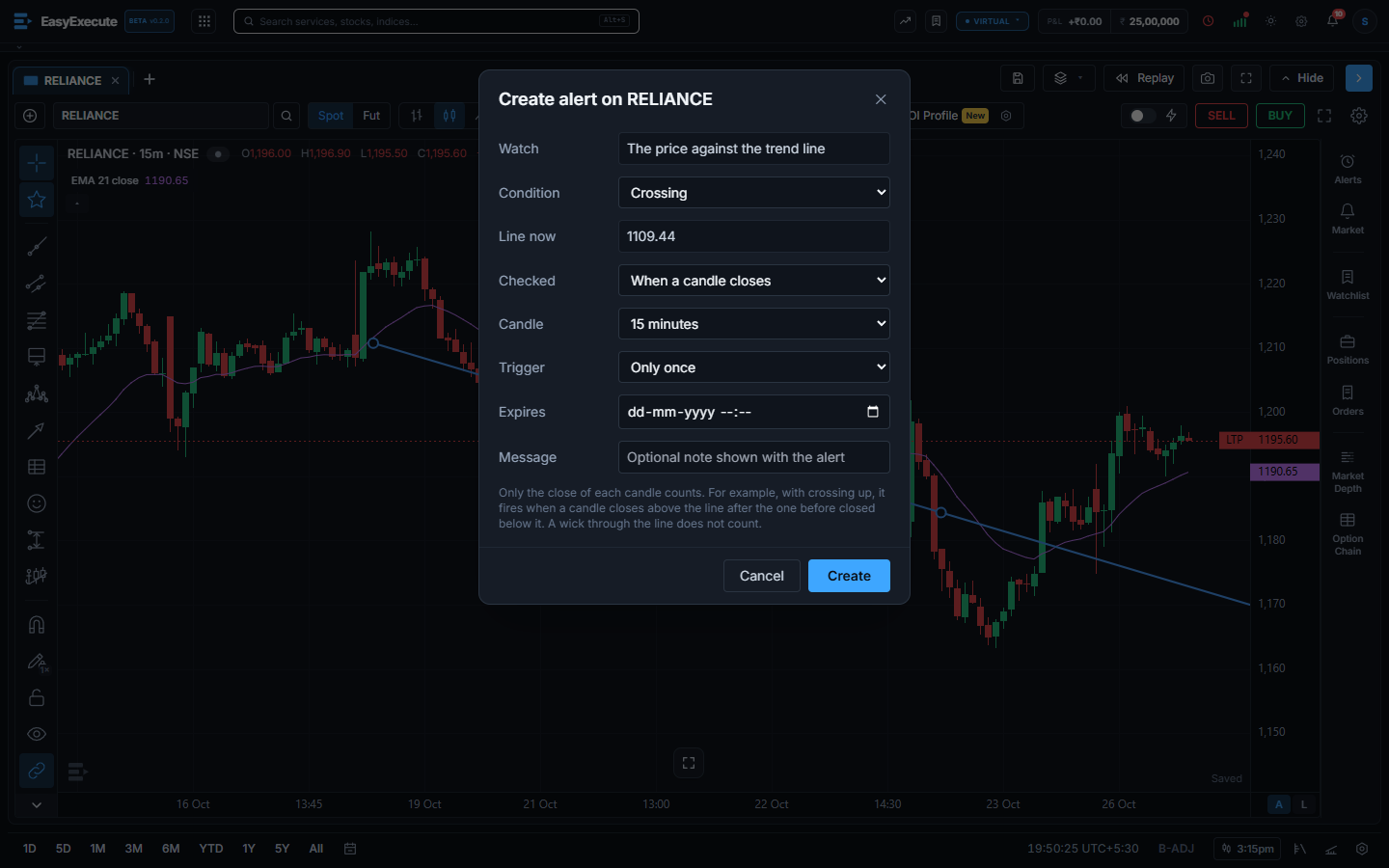
- Draw the line, click it, and press the bell (Add alert on this drawing). The box says “The price against the trend line” and shows where the line is right now.
- Condition: crossing, crossing up, crossing down, greater than or less than the line.
- Checked: on every price change, or only when a candle closes. For a candle close, pick the candle length, from 1 minute to 1 day. A candle that only pokes through the line with its wick does not count.
- For example, “crossing up” on a 15 minute close fires when a candle closes above the line, after the one before it closed below the line.
- A trend line counts only between its two points. A ray goes on to the right, and an extended line goes on both ways. If you switched on Extend in the line’s settings, that counts too. A line that has already ended cannot fire, so the box tells you to extend it first.
- Trigger: only once, or every time (at most once a minute). You can set an expiry time and a note.
- A horizontal line still makes an alert on its price. The alert shows in the Alerts panel as Trend line, and you get a pop-up and a message in the bell when it fires.